
The self-hosted control panel for modern web apps
Deploy Laravel, WordPress, PHP, Django, Flask, FastAPI, Next.js, Nuxt, Node.js, and static sites on your own VPS. Fluxo manages Nginx, SSL, databases, deployments, processes, and backups from one dashboard.
Read the documentationThe actual control panel
See what you will manage
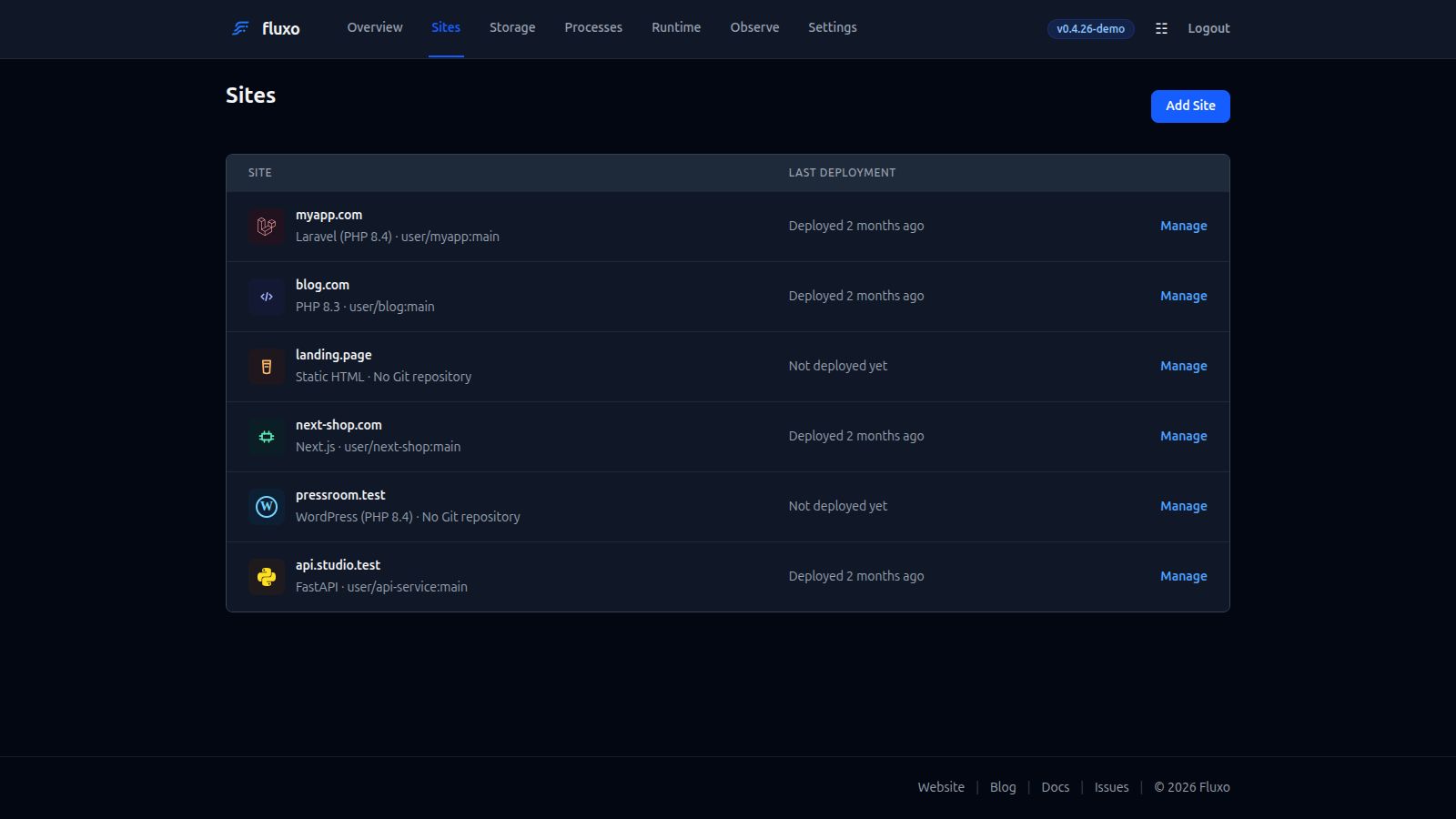
Run your apps and server from one place
No hosted control plane and no recurring panel fee. Fluxo runs on supported Ubuntu servers under your control.
Multiple Application Types
Deploy Laravel, WordPress, custom PHP, Python, Next.js, Nuxt, Node.js, and static sites with app-aware defaults.
Release-Based Deployments
Build away from live traffic, activate completed releases atomically, trigger from GitHub, and keep failures visible with full output.
Domains and Certificates
Manage application and panel domains, certificates, wildcard cloning, and validated per-site Nginx vhost overrides from the dashboard.
Databases and Backups
Manage MySQL, MariaDB, and PostgreSQL, then back up site files and databases to private S3 or R2 storage.
Processes and Automation
Supervise Node.js, Python, and Laravel processes, schedulers, queues, cron jobs, and other systemd daemons.
Operations and Diagnostics
Run commands, inspect deployment output, tail logs, monitor resources, manage SSH keys, and configure UFW.
$ curl -fsSL https://fluxo.fottify.com/install.sh | sudo bash
# System: Ubuntu 24.04 LTS (x86_64)
# Allocating server dependencies...
✔ Web Server (Nginx v1.24) installed
✔ PHP-FPM (Default PHP 8.4) installed
✔ Database (MariaDB v10.11) installed
✔ SSL Engine (Certbot Let's Encrypt) installed
✔ Security Wrapper (UFW Firewall) configured
✔ Fluxo panel daemon initialized on port 9595!
Deploy on your
preferred VPS
Fluxo runs directly on a clean supported Ubuntu server. The installer validates the host and release-pinned tools before configuring services natively, without requiring a hosted control plane or container runtime.
One-Command Provisioning
Select the database, Redis, Node.js, and Python options you need. Fluxo configures Nginx, PHP, Certbot, UFW, and systemd services around those choices.
Run Anywhere
Deploy on AWS, DigitalOcean, Hetzner Cloud, Google Cloud, Vultr, or your own dedicated bare metal server using a supported operating-system image. Your applications remain on infrastructure you control.
One server, multiple
application stacks
Run PHP, Python, Node.js, static sites, databases, and managed processes from one control panel. Fluxo applies the appropriate Nginx and runtime configuration for each site type.
PHP Runtimes
Run Laravel, WordPress, or custom PHP code. Toggle PHP versions and enable Laravel-focused helpers like Scheduler, Queue Workers, Nightwatch, Horizon, maintenance mode, and Octane where it fits.
Node.js Services
Host Next.js, Nuxt, or custom JavaScript and TypeScript servers. Choose npm, pnpm, Yarn, or Bun, then let Fluxo build and supervise the app process.
Python Applications
Deploy Django, Flask, FastAPI, or generic WSGI and ASGI services with an isolated virtual environment, pip or uv, Nginx proxying, and a supervised systemd process.
Database Services
Start, stop, and restart database engines (MariaDB, PostgreSQL, or Redis cache) and manage credentials and user grants from the interface.
Static Websites
Serve single-page frontend apps (Vue, React, Vite, or simple HTML/CSS/JS) with optimized virtual host configurations and release-based deployments when connected to Git.
Create Site Wizard
Configured Components & Integrations
 NGINX
NGINX MariaDB
 phpMyAdmin
 PostgreSQL
 PHP
PHP Laravel
 WordPress
 Redis
Redis Node.js
 Python
 Next.js
 Nuxt
Nuxt Let's Encrypt
 GitHub
 Ubuntu
See it in action
Try the live demo to explore the dashboard. No sign-up required. Open it and explore.
Launch DemoProvision Your Server
Deploy Fluxo directly to a clean server instance. The installer handles Nginx, PHP, WP-CLI, optional Node.js and Python application support, databases, Certbot SSL, and UFW firewall rules natively.
# Fluxo version in this release: v0.4.32
# Run the installer command as root:
curl -fsSL https://fluxo.fottify.com/install.sh | sudo bash# The installer automatically provisions:
# - Nginx Web Server & default PHP 8.4
# - Safe UFW defaults & Fail2Ban
# - Certbot Let's Encrypt engine
#
# It interactively prompts for Databases, Redis, Node.js, and Python application support.
# For automated setups, you can bypass prompts using flags:
curl -fsSL https://fluxo.fottify.com/install.sh | sudo bash -s -- --db-engine=mysql --redis --no-node --no-python# Installed Fluxo version: v0.4.32